Release Overview - Unimus 2.9.0
Unimus 2.9.0 brings substantial quality of life improvements, expands the Compliance engine with Notifications and Exports, and brings a significant APIv3 expansion. Also present are notable performance gains, support for 12 new device types and fixes for various bugs and issues.

A new major Unimus release is here, with plenty to show - 5 new major features, 25 minor features and improvements, fixes for 35 various issues and bugs, and support for 12 new devices types.
Unimus 2.9.0 brings substantial quality of life improvements (especially for working with large preset libraries and complex Compliance presets), along with a sizable API endpoint expansion that allows for more automation and integration with external systems.
2.9.0 also builds on the Compliance engine introduced in 2.8.0, adding notifications and export capabilities to make it more practical for both day-to-day operations and ongoing compliance auditing and validation.
Let us show you (almost) everything that is new...
Quality-of-life improvements
Searching, sorting and ordering options have been added across all of Preset-based screens - Saved searches, Compliance presets, NMS presets, Network scans, MCP presets, and MCP API jobs. We also added a configurable per-page object count (defaulting to 250, previously only adjustable via a config property) to screens when paged result are displayed. For users managing large numbers of presets, this significantly improves navigation and usability.
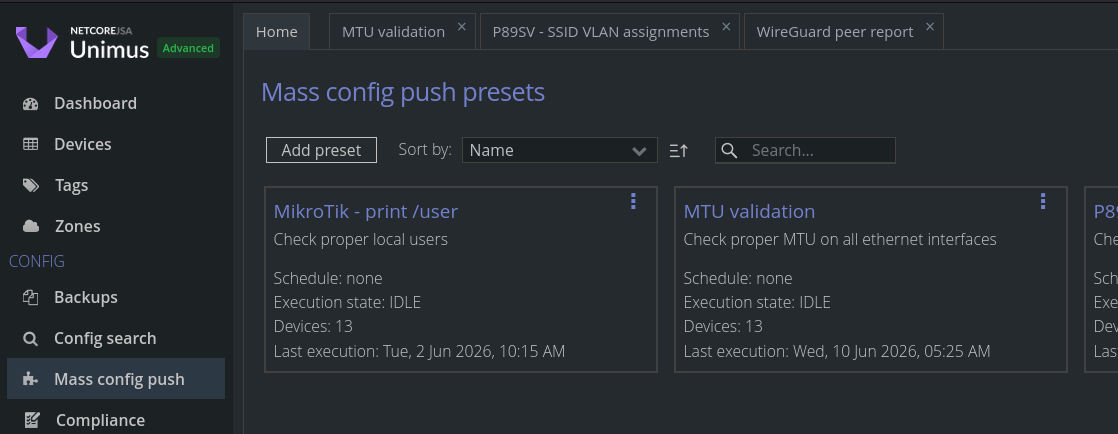
A search field has also been added to the Compliance preset screen, allowing you to quickly find rules and conditions within complex presets.

The performance of the Compliance engine has also been improved when evaluating a large number of devices.
Our Mass Config Push also gets a frequently requested improvement: devices from an Output Group can now be set as Targets for another MCP preset.
For example, a preset that runs a show version command to identify devices on a specific firmware version, can set the devices in one of its Output Groups directly as Targets of a second preset that executes a firmware upgrade - no manual device selection needed.

We will continue to add more (and more significant) UX improvements in our upcoming releases!
Compliance result notifications
We released our Compliance module in Unimus 2.8.0. Since we wanted to "get it in your hands" as soon as possible, we decided to ship it without Notifications support. In effect, keeping tabs on your Compliance state meant checking in on the Unimus web GUI. With 2.9.0, Unimus can notify you about compliance changes as they happen.
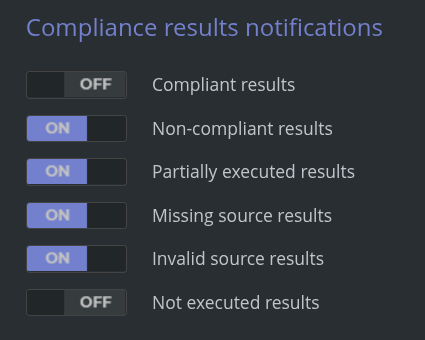
Compliance result notifications are enabled per Compliance result type - you choose which preset statuses should trigger notifications (for example, a preset flipping to Non-compliant), and Unimus will push an alert to your configured channels (email, Pushover, and/or Slack) whenever a Compliance preset changes into one of the selected states.
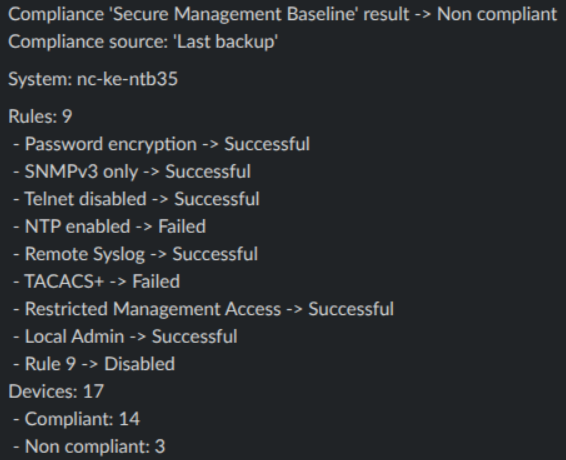
Each notification includes the preset name and status, the validated source type, a breakdown of rules and their status, and a total device count per compliance state.
Compliance result exporting
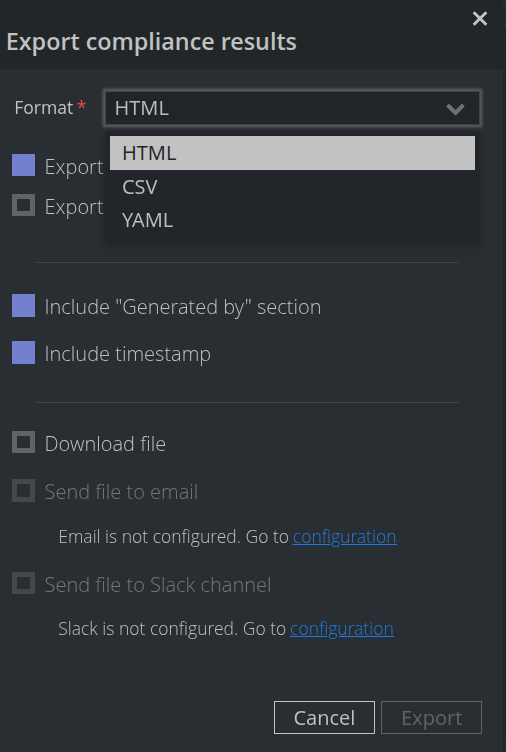
Alongside notifications, you can now export the Compliance state of your network device inventory directly from the Compliance results tab.
Exports are available in HTML, CSV or YAML formats, and can be filtered to include only specific devices and Compliance preset statuses - useful for sharing targeted reports with specific teams or management. Exported results can be downloaded or sent via email or to a Slack channel directly from the Unimus UI.
API expansion
The API feature parity with the GUI has grown considerably with this release. The biggest expansion is in API v3 endpoints, which now includes:
- Endpoints for retrieving lists of existing Presets of Mass Config Push, NMS Sync, Network Scan, and Compliance.
- Endpoints for executing your existing Presets for all of the above features.
- Endpoints for accessing Compliance results, including Preset, Rule, and Condition details.
- A new Unimus server system metrics endpoint for external monitoring and Grafana dashboard integration.
You can explore the new API v3 endpoints at: http://your-unimus-ip:8085/api/v3/ui.
On the API v2 side, you can now set the Managed flag when creating or updating a device, allowing you to control whether a device is treated by Unimus as managed or unmanaged.
API Token permission scopes
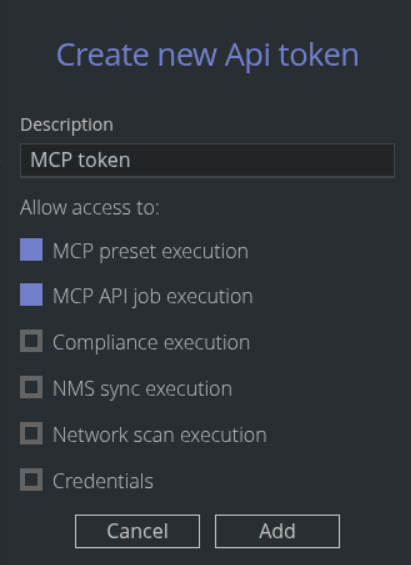
API tokens can now be restricted to specific scopes such as MCP, Compliance, NMS sync, or Network Scan preset execution, so each of your external integrations only has the access it actually needs, enforcing the principle of least privilege.
We plan to continue improving this in the future - and hope to have full API per-token permission scoping in place going forward.
SSH protocol-level improvements
Under the hood, our SSH protocol level library has been updated - a substantial jump that brings support for post-quantum key exchange algorithms, including mlkem768x25519-sha256 and other mlkem variants, as well as sntrup761x25519-sha512; improving compatibility with modern SSH server configurations.
Bug fixes and new device support
Fixes for 35 various issues and bugs (ranging from backend, device drivers, all the way to the UI fixes) have been implemented. Backup uploads via the API now also support files exceeding 1 GB, resolving a known limitation with large backups pushed to Unimus over the API.
This release also adds support for 14 new platforms and device types, please see the full list beflow.
For the complete list of changes, including all minor features, fixes, and newly supported devices, here is the full 2.9.0 Changelog:
= Version 2.9.0 =
Features:
  Added a "Search" field across all preset-based screens (Config Push, NMS Sync, Network Scan)
  Added an option to set devices from a Config Push Output Group as Targets to another Config Push
  Added "Search" in the Compliance preset screen, allowing searching in Rules and Conditions
  Unimus now automatically detects MariaDB as the database even if you selected MySQL in your config and connects accordingly
  Added a new "metrics" APIv3 endpoint under "/api/v3/metrics" which exposes Unimus performance metrics over the API
  Significantly improved API performance when loading large item lists through the API
  Significant improvements for Config Search on very large deployments (40k+ devices)
  You can now move individual devices between Zones in "Zones > Devices in Zone > Show > Select > Move"
  Improved UI performance with large number of jobs / events happening concurrently
  Older UI toast notifications (top right) will now auto-dismiss when more than 50 notifications are stacked up
  Added an option to Disable a single Compliance Rule
  Improved handling for Config Push / Pull (MCP) "Output Group > Set devices as targets..." when Group contained deleted devices
  Added support for very large backup (1GB+ text/binary) upload over the API
  Performance improvements for large target-sets in the Compliance feature
  Various minor UI / UX improvements and fixes (help texts, styling, element alignment and spacing, etc.)
  Improved CPU usage during Discovery and Backup and optimized CPU use in device communication code
  Improved support for iXsystems / TrueNAS - we now retrieve much more data during backup
  The Accedian driver will now issue "session writelock" before doing "configuration export" to avoid "You don't have the write lock" errors
  Added support for devices that use multiple different pagination prompts in outputs of from a single command
  Added support for more variations of prompt shortening with very long commands on Cisco IOS-XR
  Improved built-in dynamic data filters for changes on Digi devices
  Added support for terminal logs on Digi devices (these will no longer cause job failures)
  Added detection for failure to switch to "configure" mode on Aruba when managed by ACP
  Added error recognition for "ambiguous value..." errors on MikroTik RouterOS devices
  Added support for newer firmware versions of Raisecom RAX / ISCOM devices
  Improved support for devices which output non-UTF characters on the CLI

  Added ordering and sorting selectors to all Preset and Rich-row screens:
    - In any Preset-based or Rich-row-based screens, you can now select ordering and sorting
    - This applies in: Mass Config Push, Compliance, Saved Searches, Network Scan, NMS Sync, API Jobs
    - Ordering choice is remembered on each screen per each user account if you choose non-default

  Added Notifications for the Compliance feature:
    - Unimus will now send a notification if the Compliance status of any device changes
    - You can configure on which compliance changes you want to be notified on in the "Notification" settings
    - Notifications contain grouped details on the preset/rule/condition/devices which changed their Compliance status

  Added Export functionality to the Compliance feature:
    - You can now Export the "Compliance results" table to store or use in external systems
    - Export is supported in full HTML format, or in a .csv and/or .yaml formats
    - Exports can be directly downloaded or sent through any available Notification Sender directly from the Export UI

  New API endpoints added:
    - Your existing Config Push / Pull (MCP) Presets can now be executed over the API (2 new API endpoints)
    - Network Scan and NMS Sync Presets can now be executed over the API (4 new API endpoints)
    - Added option to set device Managed / Unmanaged state over the APIv2 "devices" endpoint
    - Compliance results can now be retrieved over the API (11 new API endpoints)
    - Compliance runs can now be triggered over the API (1 new API endpoint)
    - New "metrics" APIv3 endpoint under "/api/v3/metrics" which exposes Unimus performance metrics over the API

  Added new restrictions for API Tokens:
    - You can now select which endpoints (features) an API Token has access to
    - All write-operations and sensitive data endpoints are disabled by default

  SSH client updates, added support for the following KEX algorithms:
    - mlkem768x25519-sha256
    - mlkem768nistp256-sha256
    - mlkem1024nistp384-sha384
    - sntrup761x25519-sha512

  Added support for:
    - Acme Packet OS
    - Alcatel AOS Version 8
    - Aruba 9012
    - Aruba AOS-10
    - Harmonic CableOS vCMTS
    - Hyconext NextWav switches
    - Linovision switches
    - Oracle SBC / Session Border Controller
    - Parks S/A Fiberlink OLTs
    - Sophos SFOS
    - Sophos XGS
    - TrueNAS Scale
    - Waystream iBOS

Fixes:
  Fixed API Push Job retention would not work if there were more than ~33.000 API jobs in history
  Fixed searching in the "Config Search > Saved Searches" list could return incomplete results
  Fixed when a device import failed partially (some devices imported but overall failure), devices could remain hidden to the user
  Fixed Saved Config Searches in HSQL overriding each other - in effect you could only have one saved search on HSQL
  Fixed an error to finish the Deploy Wizard or application startup if you configured the DB as MySQL, but the DB was actually MariaDB
  Fixed changing the amount of objects per page could cause Config Search results not to show at all in certain edge-cases
  Fixed Zone creation could become permanently disabled after deleting a Zone or updating a Zone's owner, requiring a screen change to recover
  Fixed errors in the logs and the GUI when with multiple browser tabs opened, you would enter and leave a preset-based screen
  Fixed Custom Backup Flows could not be visible at all if user didn't have access to all devices targeted by the Flow
  Fixed attempting to upload very large backups (1GB+) over the API would cause very high CPU usage
  Fixed Config Search could take a very long time on deployments with a large number of devices (40k+)
  Fixed if an application shutdown / crash occurred during change of Compliance Targets, the Targets could be incorrect
  Fixed device backup counter in "Backups" would not live increment when backups were uploaded through the API
  Fixed the line numbers in the "Variables" window could get broken and not scroll with the content
  Fixed attempting to create a Zone with incorrect NetXMS configuration as a Connection method would spawn error notifications constantly
  Fixed the server URL in built-in APIv3 Swagger docs would ignore HTTPS and always use HTTP
  Fixed you could select the same device type or vendor value multiple times in Backup Flow targets
  Fixed switching themes (Light/Dark) would trigger errors in the logs
  Fixed the "Added per..." column could something not show in the Compliance "All Targets" table
  Various minor UI / UX improvements and fixes (15+ minor visual issues fixed)
  Fixed a Remote Core would fail to transfer a job result, if an individual object (Backup, Config Push / Pull result, log) was larger than 5MB
  Fixed if device disconnected the SSH session, it would not be shown as disconnected in "Devices > Device CLI"
  Fixed very long Config Push commands would fail to execute on Cisco IOS-XR
  Fixed an issue where some MikroTik command outputs could produce visual artifacts in the outputs of a Config Push / Pull result
  Fixed invalid command output could be consumed as a backup on HP(E) ProVision / ProCurve / ArubaOS in very rare cases
  Fixed some specific Zyxel switches could be wrongly detected as Grandstream
  Fixed backup could fail on newer versions of Sophos XG firewalls
  Fixed jobs would fail on Dell PowerConnect switches with non-default unit IDs
  Fixed prompt could be considered as part of output on Digi devices in Config Push, breaking Output Grouping
  Fixed "show vlan brief" not captured during backup on Cisco Catalyst running IOS-XE
  Fixed jobs would fail on specific HP(E) Comware switches (ex. HPE 5150EI)
  Fixed jobs would fail on Raisecom RAX with newer firmware versions
  Fixed jobs would fail on Digi devices with terminal logging enabled
  Fixed jobs could fail on Calix OccamOS devices with specific characters present in the config
  Fixed jobs could fail on some versions of Nokia SR Linux
  Fixed jobs could fail on specific version of the Cisco WLC
  Fixed jobs could fail on specific version of Cisco ESW switches
  Fixed jobs would fail on very specific versions of the HP(E) ProCurve / ProVision firmwares
  Fixed jobs would fail on very specific versions of the HP(E) AOS-S firmwares
  Fixed including some non-config items in backups of Vertiv devices
  Fixed backup command was present in the backup data across 6 various drivers

Security fixes:
  Fixed users without access to all devices could still modify the Default Connectors settings
  Fixed read-only users could enter the New Compliance Preset creation screen
  Fixed when a user lost access to a Compliance Preset, the "Add rule" button would still be available
  Fixed users without access to any devices in a Custom Backup Flow could still see that the flow existed
  Fixed users without access to all devices in a Custom Backup Flow would still see the total count of all devices covered by the Flow